
Xilisoft DVD to MP4 Converter for Mac
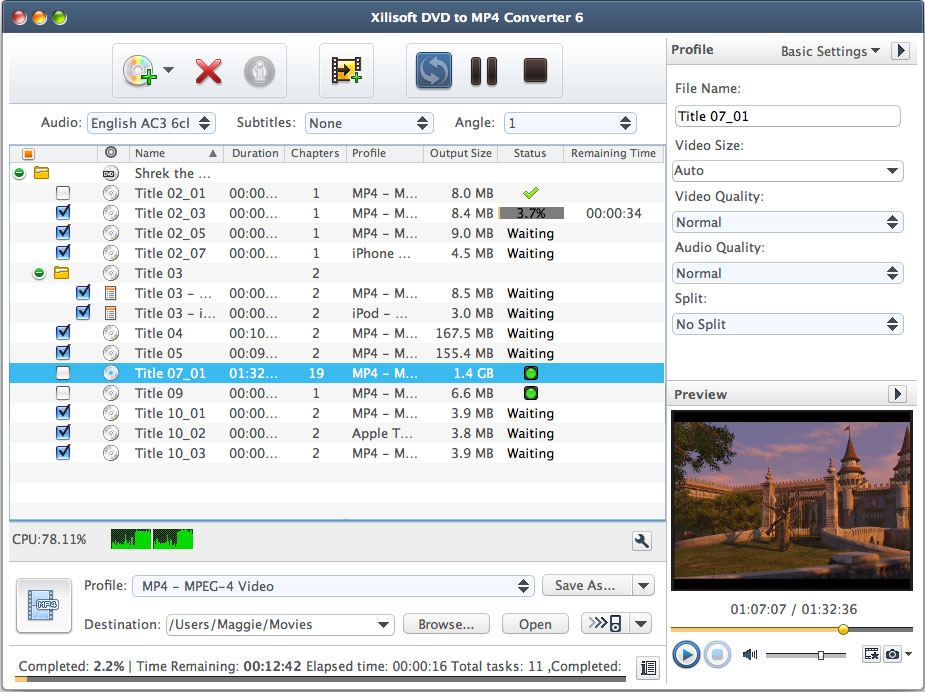
Especially designed for Mac users, Xilisoft DVD to MP4 Converter for Mac provides the best way to convert Home DVD to MP4 format for iPod, iPhone, iPad, Galaxy, Archos, iRiver PMP, Creative Zen, and Apple TV. You can also extract audio from Home DVD movie and convert Home DVD to MP3, AAC or M4A format with this Mac Home DVD to MP4 converter.
The Home DVD to MP4 Mac converter offers several optimized output formats for each device to best match your need and ease your choice. Free download Xilisoft DVD to MP4 Converter for Mac to have a wonderful experience on Mac Home DVD converting now.
- Convert Home DVD to MP4, H.264/MPEG-4 AVC, H.265/HEVC, AVI, MPEG, DivX
- Convert Home DVD to MP4 players - iPad, iPhone, etc
- Convert Home DVD to MP3, AAC, M4A, etc.
- Can't rip/convert DVD with copyright


Safe Download 100% Virus Free

Secure Online Payment

30 Days Money Back Guarantee

Free Customer Service
Customers Also Choose:
Xilisoft iPhone Magic Platinum for Mac
Transfer contents between iPhone and Mac/iTunes. Manage iPhone easily. Convert DVD, CD, videos, audios to iPhone.
Xilisoft Video Converter Ultimate for Mac
Convert common and HD/3D videos in 160+ formats on Mac. Merge, clip and split videos, add video effects, watermark, subtitle, soundtrack, etc.

- Convert DVD to MP4, AVI to play on digital players
The Mac DVD to MP4 converter can convert DVD to MP4 and AVI formats for multiple MP4 players, to DivX, XviD movie, and to general MP4/AVI videos. - Get music audio from DVD
You can also extract music from DVD with the Mac DVD to MP4 converter and save as general MP3, M4A or AAC format.

Optimized and flexible output 
Abundant output formats and further customization in the DVD to MP4 Mac tool
- Multi-output from one source
Set multiple profiles with different codecs or parameters for the same video to meet various requirements. - Choose an exact format with ease
With abundant device based output formats supported, you can choose optimized MP4, AVI format right for PSP, PS3, video iPod, iPhone, Archos, iRiver PMP, Creative Zen, and Apple TV. - Settings for output file
The Mac DVD to MP4 converter provides general and advanced settings for you to customize output file, e.g. you can select output audio track, subtitle in general setting and set split method and bit rate in advanced settings. - Clip DVD file to output
Using clip function, this DVD to MP4 Mac converter helps you get wanted segments from a video and output them respectively or as a whole one. - Customize output file size
Want to get a file with the needed size? With the smart Bitrate Calculator, just need to enter the size you want.

Faster and easier than ever before
Xilisoft DVD to MP4 Converter for Mac can ease your operation mostly
- Faster and easier
Just choose the format for your device and start converting , your DVD will be converted to the target you want with high speed. - Preview and Snapshot
Provides you with a built-in resizable player to preview DVD movie and snap your favorite screens. - Multiple languages supported
Provide English, French, German, Spanish, Chinese and Japanese interface languages for you to choose in the DVD to MP4 Mac software.
| Output Devices Supported | |
| iPad, iPad mini, iPad Air, iPad Pro (12.9/9.7/10.5/11 inch), iPod nano/mini/shuffle/classic/touch, iPhone 3G/3GS/4/5/5S/5C/SE/6/6S/7/8/X/XS/XR/11/12/13/14/15 Series. PSP, PS3 General MP4 players: Archos, Creative Zen, iRiver, etc Android phone: Samsung Galaxy Note II (n7100), Samsung Galaxy S III (i9300), Samsung Galaxy S II (i9100), LG Optimus 4X HD (P880), LG Optimus 2X (P990), HTC DROID DNA (X920), HTC EVO 4G LTE (ONE X), HTC ONE V, Motorola DROID RAZR MAXX HD, Motorola Photon Q, Sony Xperia TL (LT30), Sony Xperia S (LT26), Sony Xperia P (LT22) Google phones: Google Nexus 4 Windows phone: Nokia Lumia 920, Nokia Lumia 820, HTC Windows Phone 8X, HTC Radar 4G, Samsung Focus S | |
| Input File Formats Supported | |
| DVD-Video, DVD folder | |
| Output File Formats Supported | |
| Video | AVI, MPEG, MP4, MPEG-4 AVC, MPEG-4, DivX, XviD, H.264, H.265/HEVC |
| Audio | MP3, AAC, M4A |
| Image | BMP |
| Processor | Intel® processor |
| OS | 32 bit: Mac OS X v10.6 - 10.14(Mojave) 64 bit: Mac OS X v10.9 - macOS Sequoia (Version 15) |
| RAM | 512MB RAM |
| Free Hard Disk | 100MB free hard disk space for installation |
| Graphic Card | Super VGA (800×600) resolution, 16-bit graphics card or higher |
| Others | DVD-ROM drive |


